Five modules, one database
Selldi is an all-in-one sales platform for wholesalers, distributors and manufacturers. Each module is switched on separately, but all of them work on the same products, stock and customers, integrated with your ERP. Below each module with screenshots from the demo (sample data; the demo catalogue is in Polish, the customer panel interface is available in English, German and Ukrainian).
B2B platform: buyers order themselves, at their own prices
Three panels on one database. The wholesale buyer sees their own net prices, orders from several carts and checks documents from the ERP. The account manager runs their accounts, individual prices and offers. The administrator sets markets, price lists, roles and e-mail templates. Orders reach the ERP as documents, and the VAT rate follows the verified status of the account, not the address.
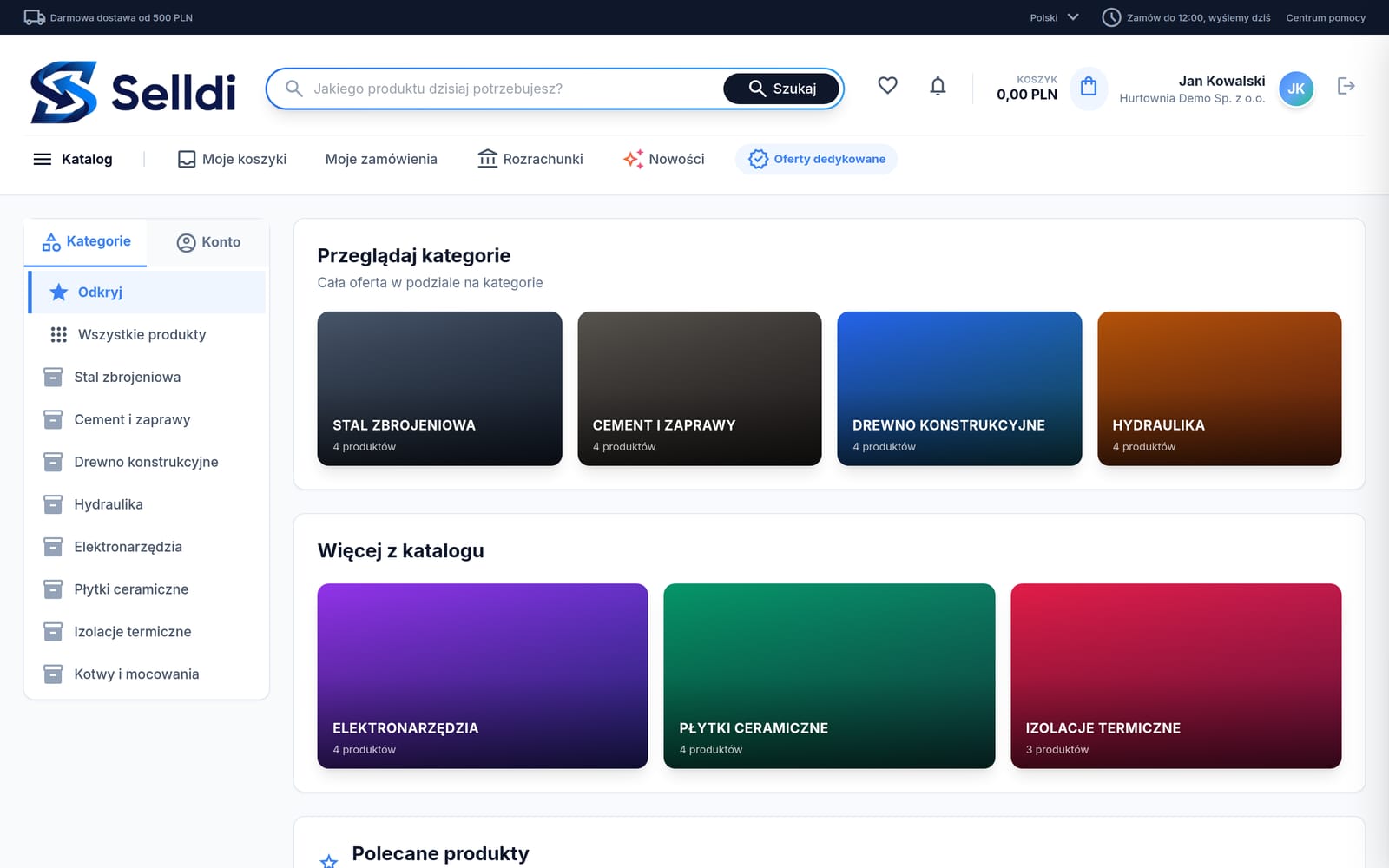
Every customer sees their price
The net price follows the market, the group or the individual terms. Nobody sees anyone else’s terms, and reps stop sending price lists as attachments.
Orders reach the ERP without retyping
An order becomes an ERP document with lines, customer and delivery address. If the ERP is down, the order waits and is retried automatically.
Commercial terms stay in the company
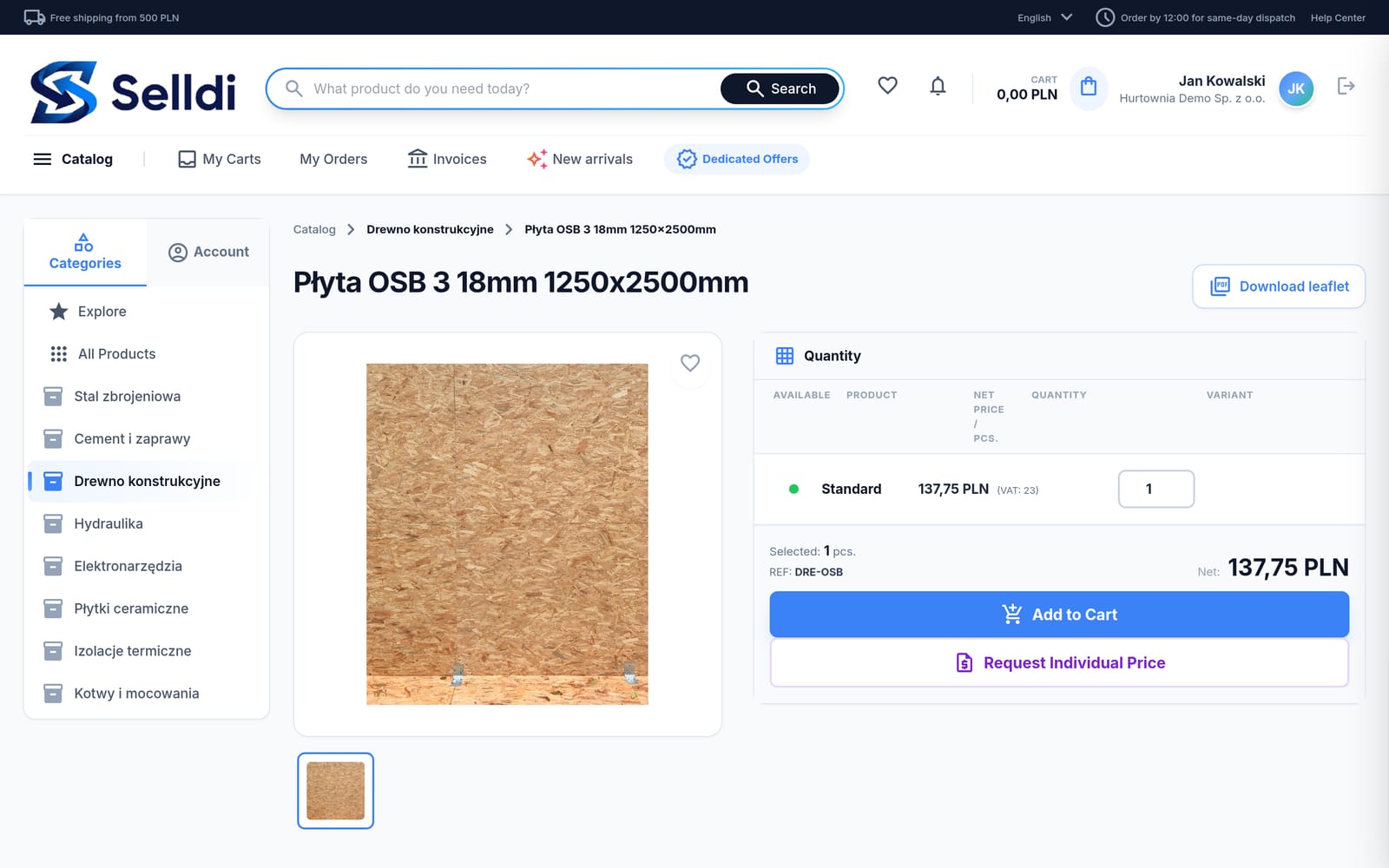
Individual prices, dated dedicated offers and price requests are stored on the account, with an author. When a rep leaves, the terms keep working.
What exactly you get
- Catalogue with categories, search by name, SKU and EAN, PDF leaflets
- Net prices per market, group and account; quantity and packaging discounts; piece, carton and pallet units
- Several carts, recurring orders, quick order, reorder, drafts from the account manager
- Order history with ERP document number, PDF and pro forma; invoices and open items from the ERP
- “Request individual price” on the product card; dedicated offers with validity
- Credit limits, payment terms and delivery methods per market and account
- Registration with approval; read-only company data in the customer panel
- Account manager panel: own accounts, turnover, product visibility per market, returns, newsletter
- Administrator panel: group price list with a column per market, users and roles, banners, analytics
- 24 transactional e-mail templates in 4 languages, sent through your own SMTP
- Customer panel interface in Polish, English, German and Ukrainian
- 0 % VAT only for flagged export or intra-EU supply with a VIES-verified VAT number
- Two-factor login, separate database per company, session checked on every route
How it looks
Screenshots from the demo. Data is sample, screens are real.


Frequently asked questions
Does a customer see other customers’ prices?
No. A customer sees only the price for their market, group or individual terms. An account manager sees only their own accounts, enforced on the server, not just hidden in the interface.
What happens to an order when the ERP does not respond?
The order is stored on the platform as pending and retried automatically when the ERP is back. The administrator sees a list of transfer errors.
Can I run domestic wholesale and export on one catalogue?
Yes. A sales market has its own currency, price list, language, VAT rules, discounts and delivery methods. One catalogue, several markets, and the account is assigned to a market when its registration is approved.
B2C storefront on the same database as wholesale
The storefront sells consumers the same range the wholesaler sells to companies, from the same stock and without a second system. The owner changes theme, colours, font and page layout from ready sections, and changes reach shoppers only after publication. The product card computes the lowest price of the last 30 days, analytics shows conversion, and customer segments compute themselves from paid orders.
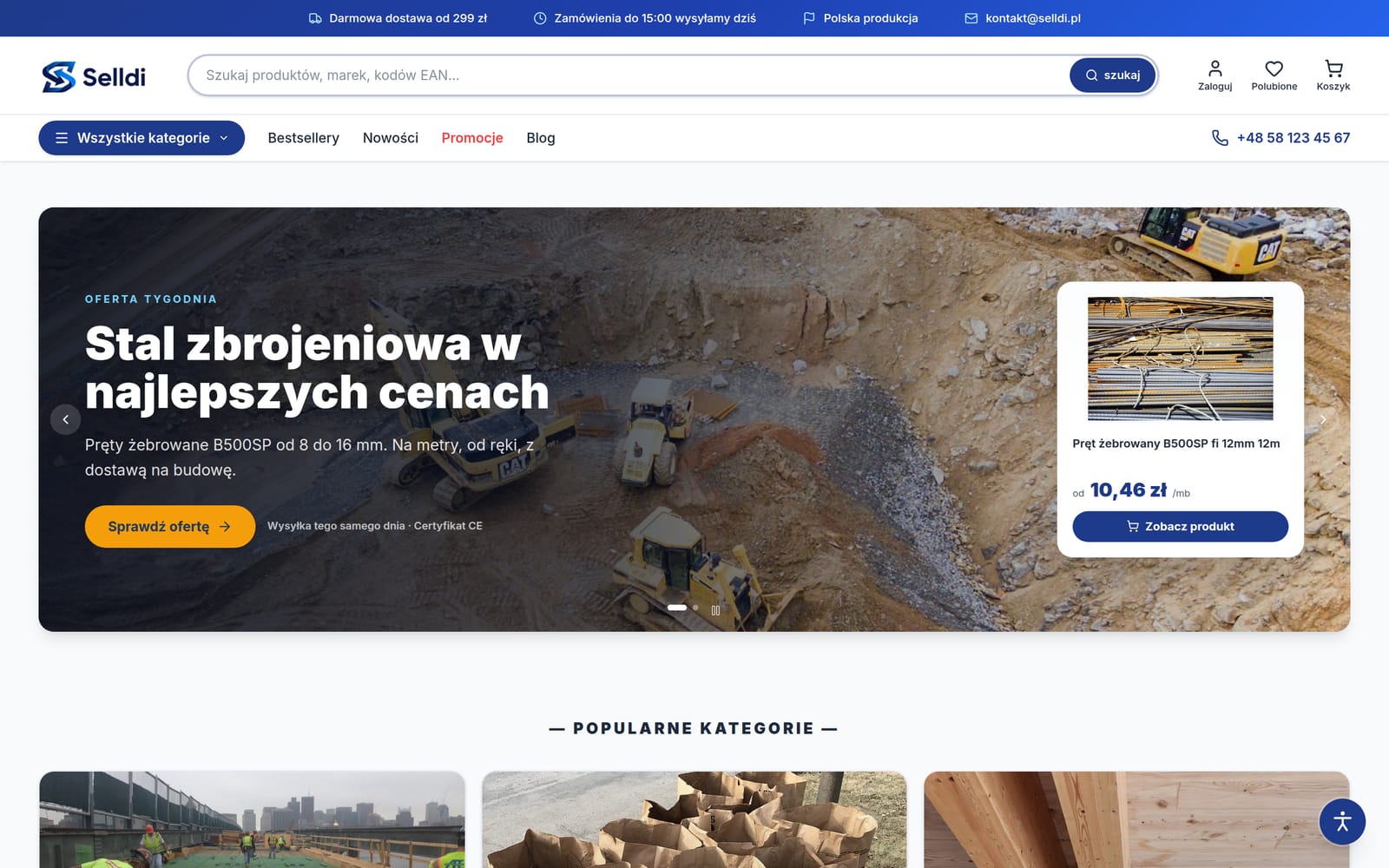
One catalogue, two channels
A product appears in the store after publication in the B2C channel. Stock comes off the same warehouse, so you will not sell retail what already went to wholesale.
You change the look yourself
Six themes, custom colours, eight fonts and page layout from 16 section types. Draft, preview, publish and version history, without an agency or code.
Numbers that mean something
Views versus add-to-cart, conversion, abandoned carts, VIP and dormant segments. Decisions instead of guessing.
What exactly you get
- Shared product and stock database with the B2B platform; separate retail texts
- Themes, colours, fonts and element shape with live product-card preview
- Home page, subpages, header and footer built from 16 section types; draft, preview, publish, history
- Product card with gross and net price, lowest price of the last 30 days (Omnibus), bundles, moderated reviews
- Coupons with code generator, promotions and banners, blog, newsletter, legal pages in two languages, accessibility statement
- Analytics: visitors, views, add-to-cart, searches, conversion, best sellers
- Customer segments computed automatically (VIP, returning, dormant, new) with CSV e-mail export
- Abandoned carts, returns and complaints, audit log of manager actions
- Google Analytics 4, Tag Manager, product feeds for Google Merchant Center and Meta, automatic SEO meta
- Online payments and couriers appropriate to the market
- AI assistant in the panel: questions about sales and stock, change proposals after approval
How it looks
Screenshots from the demo. Data is sample, screens are real.


Frequently asked questions
Does the B2C storefront need its own warehouse and catalogue?
No. It sells from the same product and stock database as the B2B platform. You only set retail prices, retail product texts and visibility in the B2C channel.
Do I need an agency to change the look?
No. Theme, colours, font and page layout from sections are changed by the owner in the panel, and shoppers see changes only after publication. An agency is useful for a fully bespoke design.
CRM for sales and export teams: markets, funnel, tenders and trade shows
The CRM organises the work of a team that wins new buyers, especially abroad. Every market has its own workspace with a funnel, tenders and trade shows, accounts move through a kanban from database to result, and the calendar and tasks are shared by the team. Customer data and orders sit on the same database as the B2B platform, so a won prospect later orders in the B2B panel of its market.
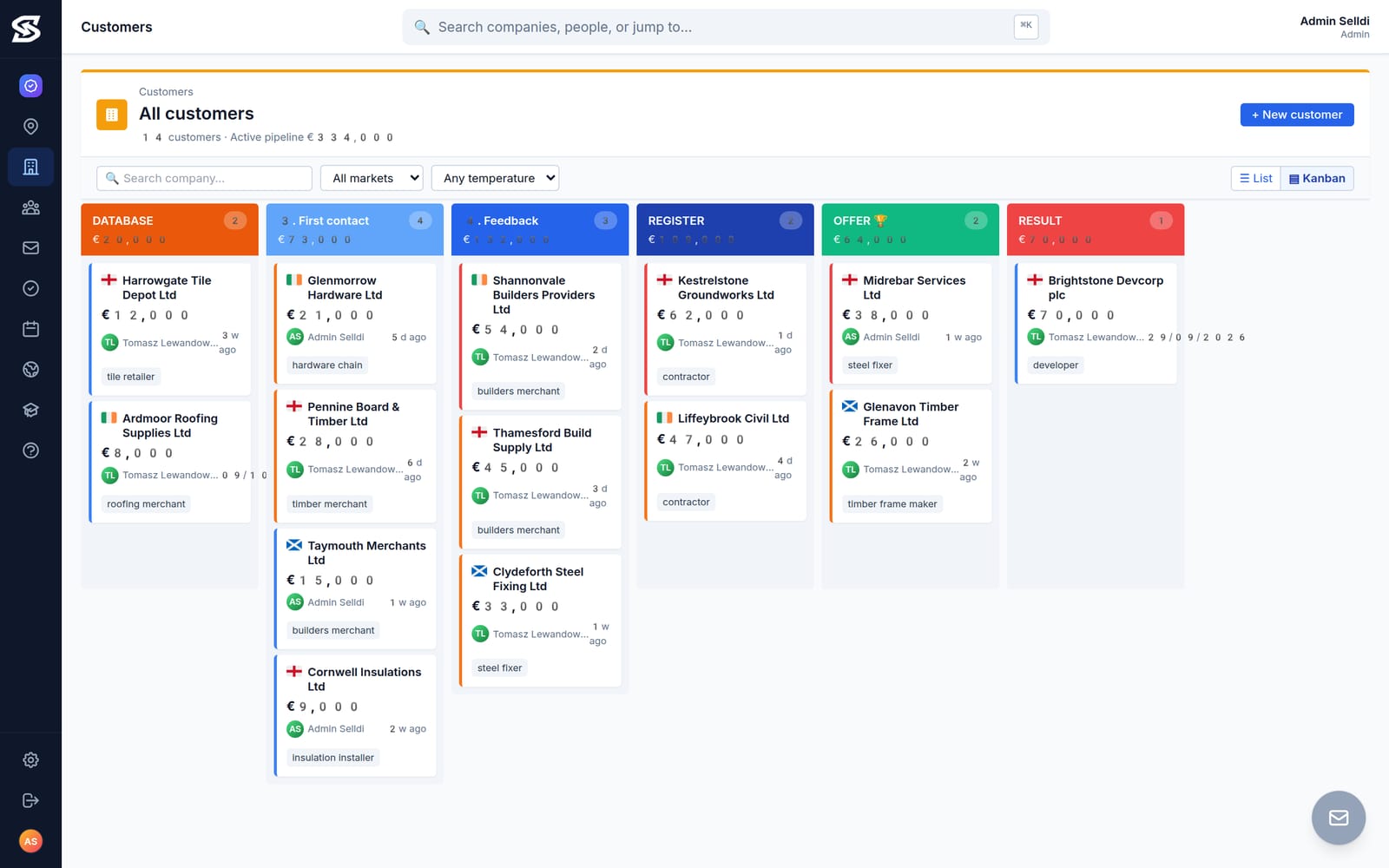
A funnel that tells the truth
Every market has counters for prospects, open tenders, trade shows and pipeline value. You can see at which stage opportunities stall.
Tenders and shows as objects, not notes
A tender has a buyer, deadline, chances and a go/monitor/pass decision. A show has a role, budget and a rating afterwards. Nothing disappears in one person’s inbox.
Cover without chaos
Calendar, tasks, conversation history and stage history live on the account. A stand-in knows in ten minutes whom to call back.
What exactly you get
- Workspace per market: Hub, tenders, trade shows, prospects, market analysis, regulations, competitors, team
- Accounts on a kanban (database, first contact, feedback, register, offer, result) or as a list
- Contact temperature, annual potential, source, company type, research card, decision-maker contacts
- Activity history: notes, calls, e-mails, offers, stage changes; tasks with deadlines and calendar events
- Tenders: buyer, deadline countdown, estimated value, competitors, chances, decision, related account
- Trade shows: dates, city, role, budget, meetings, post-event rating
- Team statistics: rep activity, new prospects, stage moves, stale opportunities, activity heatmap
- Mailbox connected to the CRM; interactive guides in the help centre
- English interface; access by role (administrator, manager, sales rep)
How it looks
Screenshots from the demo. Data is sample, screens are real.


Frequently asked questions
How is the CRM different from the account manager panel of the B2B platform?
The account manager panel serves existing buyers: prices, orders, offers. The CRM is for winning new ones on markets, with a funnel, tenders and trade shows. Both run on the same database.
Does the CRM handle public tenders?
Yes, as market objects with buyer, deadline, estimated value, competitors, chances and decision. A tender can be linked to the account through which the bid is submitted.
CENTER: one catalogue for marketplaces and the B2C store
CENTER connects retail channels and marketplaces to the same database that runs wholesale. Every channel has a stock buffer, prices come from rules computed from the net wholesale price with a nightly recalculation, orders from Allegro, Erli, Amazon and the B2C store land in one list and in the ERP, and a list of brands with missing manufacturer data keeps GPSR obligations in view.
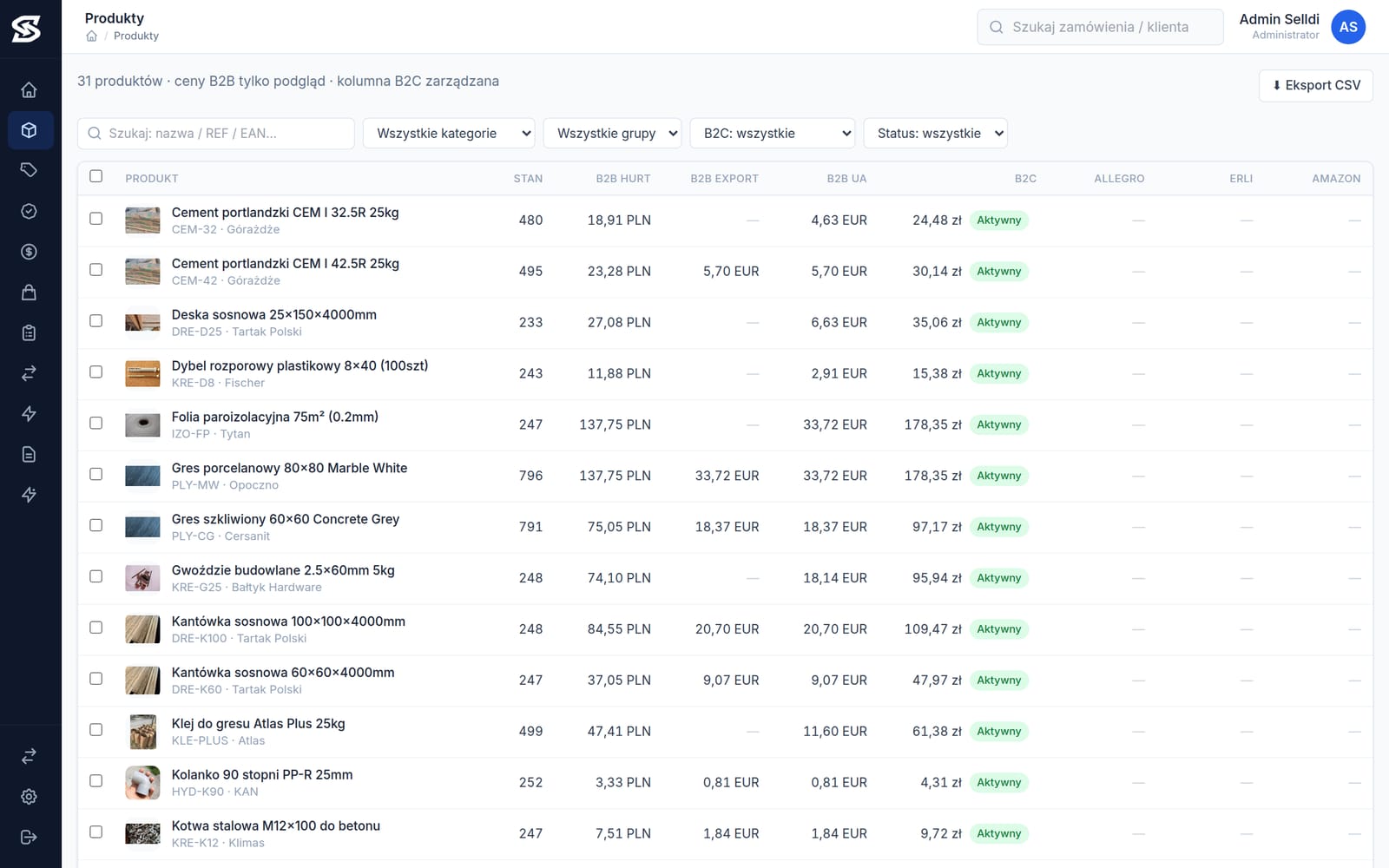
Never sell what is gone
A stock buffer per channel holds units back from the marketplace. With 100 in stock and a buffer of 10 the channel sees 90, the rest stays for wholesale buyers.
Prices from one rule, not from memory
A price rule derives the channel price from the net wholesale price. A price-list change in the ERP reaches the channels overnight; a manual override always wins and has an author.
One order list
Orders from all channels in one place, synchronised to the ERP, with “when X then Y” rules and an execution log.
What exactly you get
- Catalogue with the prices of all channels side by side: wholesale, export, other B2B markets (read-only), B2C store, Allegro, Erli, Amazon
- Stock buffers set separately for every channel
- Price rules per channel from the net wholesale price, change preview, nightly recalculation, manual overrides with author
- Orders from channels in one list with filters and ERP synchronisation
- “When X then Y” automations with an execution log
- Integrations: Allegro (sandbox and production), Erli (API key), Amazon (SP-API, offers matched by EAN), an existing Shoper store as a channel
- Manufacturer data for GPSR: brands with gaps, filled in once per brand, “Safety” tab in the B2C store
- Categories with SEO meta in Polish and English, operations log, CSV export
How it looks
Screenshots from the demo. Data is sample, screens are real.


Frequently asked questions
Where do marketplace prices come from?
From channel price rules computed from the net wholesale price in the ERP. A product without a rule takes the retail price from the ERP, and a manual override for a product always wins. Recalculation runs nightly or on demand.
Does CENTER create new product pages on Amazon?
Listing works on existing product pages matched by EAN, and Amazon orders flow to the ERP. A new product page is created on the Amazon side.
AI assistant in the sales panel: answers, proposes, changes nothing without approval
The AI assistant is built into the B2C store panel and the B2B administrator panel. It answers questions about sales, products, stock, orders and customers, and it only proposes changes (price, description, announcement, coupon, banner, colours, page-layout draft). They are executed after a click on “Approve”, go through the same path as a manual edit and can be undone for 7 days. In B2C the model receives no personal data of shoppers; in B2B accounts are pseudonyms.
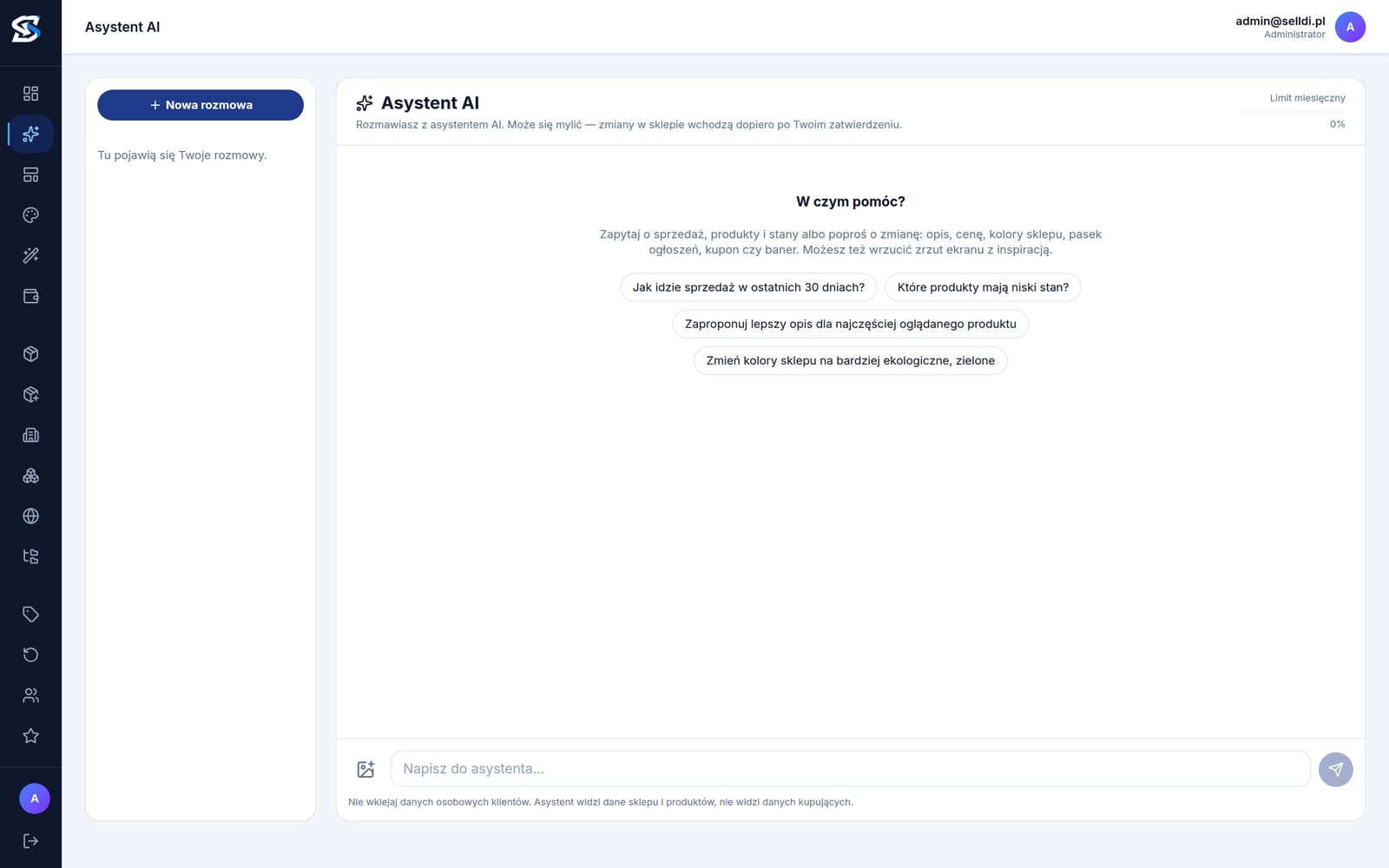
Ask instead of clicking through three screens
How sales went in 30 days, which products are low on stock, which buyers stopped ordering. Answers from your store’s data, not from the internet.
A proposal is not a change
The assistant shows exactly what it wants to do. The change happens after approval, with the permissions of the person who approved it and an entry in the history.
Undo for 7 days
Every approved change remembers the state before. If someone edited the same place manually in the meantime, the system refuses to undo instead of overwriting newer work.
What exactly you get
- Chat window in the corner of every panel screen (aware of the current screen) and a full-screen conversation with history
- B2C: questions about sales, products, stock, orders, settings, coupons, banners; proposals for prices, descriptions, SEO, coupons, banners, announcements, look and layout draft
- B2B (administrator only): dashboard, products, customers by turnover and inactive, orders, base and group prices, offers, requests; reads from CENTER and CRM when enabled
- Human approval of every change; a double click will not execute a proposal twice
- Undo for 7 days with a check that nobody changed the same place in the meantime
- Data protection: no personal data of shoppers in B2C, pseudonymised accounts in B2B
- Screenshots as inspiration for colour and layout proposals
- Billed from an AI credit pool in the subscription, monthly usage visible; enabled per store
How it looks
Screenshots from the demo. Data is sample, screens are real.

Frequently asked questions
Does the assistant see customers’ personal data?
In the B2C store it receives no personal data of shoppers. In the B2B platform wholesale accounts are pseudonyms for the model, and the company name is resolved only in the administrator’s browser.
Who has access to the assistant?
In the B2C store the store manager. In the B2B platform administrators only; account managers and buyers do not see it.
ERP integrations
Every module runs on data from your ERP. Polish systems (Comarch, Subiekt, Symfonia) out of the box, any other ERP through its API. Integration pages are in Polish:
Want to see it live?
An online demo on data close to your industry, then a test database with your products and a quote matched to the modules you need.