Trade Credit and Payment Terms in B2B E-commerce

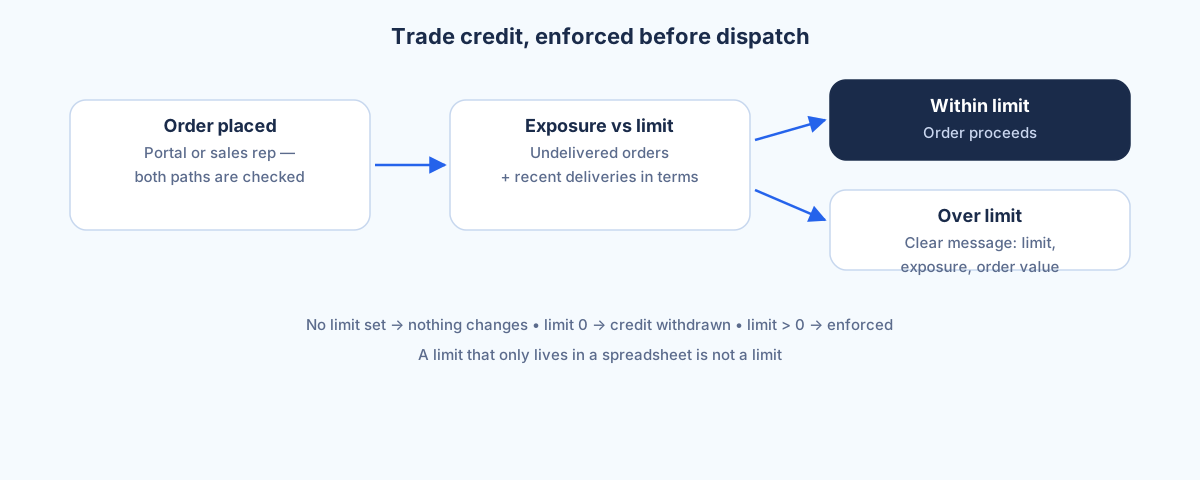
Trade credit in B2B e-commerce means letting a wholesale customer buy now and pay later, on agreed terms, without anyone tracking the risk in a spreadsheet. In Selldi, the all-in-one sales system for wholesalers and distributors, each account has its own payment type (prepayment or deferred), a payment term in days and a credit limit, and the limit is enforced automatically as orders are placed. Exposure is calculated live from undelivered orders plus recently delivered ones still inside the payment term, so the system knows how much credit is already in use before it approves the next order. Crucially, the limit is checked on both the customer portal and orders a sales rep places on the customer's behalf, so it cannot be quietly bypassed with a phone call. When an order would breach the limit, Selldi shows the limit, the current exposure and the order value, so the decision is clear rather than a mystery rejection.
Why credit is the backbone of wholesale
In consumer retail payment is simple: money changes hands and the order ships. Wholesale does not work that way. A distributor's relationship with a builder's merchant, a workshop or a regional reseller is built on terms, thirty days, sixty days, an agreed ceiling of exposure, and those terms are part of the commercial deal. Take away credit and you have taken away the reason the customer buys from you rather than paying cash somewhere else. Any B2B platform that treats every order as prepaid is quietly asking wholesale customers to change how their business runs, and most of them will not.
So the question is never whether to offer credit; it is whether you can offer it online without losing control of it. That is where a lot of B2B e-commerce quietly falls back to email and phone, because the shiny front end cannot enforce the very thing that makes the relationship work. Selldi's position is that credit belongs inside the ordering system, applied automatically, not managed on the side by someone with a good memory.
The spreadsheet that nobody checks
The common failure mode is a credit limit that lives in a spreadsheet or in the finance team's heads. On paper every account has a ceiling. In practice orders go out all day, the spreadsheet is updated the next morning if at all, and by the time anyone notices a customer is well over their limit the goods have already left three times. The limit exists but it does not do anything, because nothing checks it at the moment that matters, which is before the order is accepted.
Selldi is built so the check happens at that moment. The credit rule is deliberately literal: a limit left empty means no ceiling has been set and the account orders as before, a limit of zero means credit has been withdrawn and deferred payment is simply unavailable, and any limit above zero is actively enforced on every order. That distinction matters, because it means switching enforcement on does not surprise the accounts you never gave a limit to; it only bites where you consciously set a number.
What good enforcement looks like
Good enforcement stops the order before the goods leave, not after the invoice is overdue. When a customer builds a basket that would push them past their ceiling, Selldi does not accept it and then leave finance to chase it; it declines at checkout with a message that names the limit, the exposure already in use and the value of the order in front of them. The customer can see exactly why, pay down, split the order or arrange more room, rather than staring at a generic error.
Exposure has to be honest for this to work, and Selldi calculates it without needing a full accounting integration. It counts orders that are placed but not yet delivered, plus orders that were delivered recently and are still within the account's payment term, and treats that as credit currently in use. Cancelled and returned orders drop out. Once an order has been delivered and its payment window has passed, it stops counting against the ceiling, on the assumption it has been settled. This gives a working, real-time view of risk from the order data the platform already holds, rather than waiting on a nightly feed from finance.
The rep-bypass problem
Here is the trap that catches most systems. You enforce the limit on the customer portal, feel safe, and then a customer who is blocked simply phones their sales rep and asks them to place the order instead. If the rep-facing side does not run the same check, the limit has a hole in it the size of a phone call, and everyone learns to use that hole. The control looks real but is optional in practice.
Selldi closes this by enforcing the limit on both ordering paths: the order a customer places themselves and the order a rep places on their behalf are checked against the same exposure calculation. A rep cannot slip an over-limit order through by keying it in from their side. This is a deliberate design choice, because a credit control that only covers one route is not a credit control at all, it is a suggestion. The same thinking applies to per-account permissions such as cash on delivery: if collections trouble means an account should no longer get COD, that restriction holds whether the customer orders online or the rep orders for them.
Prepayment customers and pro-forma
Not every customer gets credit, and Selldi handles the prepayment side just as cleanly. An account can be set to prepayment rather than deferred, which means the order is expected to be paid before it is fulfilled. For those customers the natural document is a pro-forma, generated from the order so the buyer has something concrete to pay against, and the platform produces it without depending on an external ERP being connected. Payment type, term and limit are all set per account, so a distributor can run prepaid new customers, thirty-day trusted ones and a few sixty-day key accounts side by side, each on their own rules, in the same store.
Because these settings sit on the account rather than being hard-wired into the code, moving a customer from prepayment to credit, or tightening a limit after a late payment, is a change to their profile, not a development task. That is the practical benefit of credit being part of the sales system: the commercial team adjusts terms as the relationship changes, and the ordering flow respects the new terms immediately.
When not to switch on hard limits
Hard credit enforcement is a control for a business that is already extending credit at scale, and it can be the wrong first move for a young operation. If your shop is new, your customer base small and everyone pays upfront anyway, setting ceilings on accounts adds a layer of policy you do not yet need and cannot yet calibrate, because you have no payment history to base the numbers on. In that situation the safer default is prepayment, and Selldi's empty-limit behaviour respects that: leave the limit unset and nothing is enforced, so you are not forced to invent ceilings before you have the data to set them well. The same caution applies when you genuinely do not know an account's reliability yet; a period on prepayment tells you more than a guessed limit ever will. Turn on hard limits when credit is real money on real terms and the risk of an unchecked order outweighs the friction of the control, not before. Used too early it is bureaucracy; used at the right time it is the thing that lets you offer credit online with confidence.
Selldi applies these credit and payment rules across markets and currencies, with the interface in eight languages, so a cross-border distributor can run different terms for different regions in one system. It connects to any ERP via API, including SAP, Microsoft Dynamics 365 and NetSuite, so the terms enforced at the point of order line up with the systems that ultimately invoice and reconcile them.
Frequently asked questions
What happens when an order exceeds the credit limit?
Selldi declines the order at checkout rather than accepting it and chasing payment later. The message names the credit limit, the exposure already in use and the value of the current order, so the customer can see why and choose to pay down, split the order or arrange more room. The goods do not leave against a limit that has already been breached.
Can a sales rep override the limit by placing the order themselves?
No. The limit is enforced on both ordering paths, the customer portal and orders a rep places on the customer's behalf, using the same exposure calculation. A blocked customer cannot get an over-limit order through by phoning their rep, because the rep-facing side runs the same check.
How is exposure calculated without a full accounting integration?
Selldi works it out from its own order data: it counts orders placed but not yet delivered, plus orders delivered recently that are still within the account's payment term, and treats that as credit in use. Cancelled and returned orders are excluded, and delivered orders past their payment window stop counting. This gives a live view of risk without waiting on an external finance feed.
Do credit limits work per currency and market?
Yes. Payment type, term and limit are set per account, and Selldi runs across multiple markets and currencies, so a cross-border distributor can apply different terms to different regions in one system. Each account is enforced on its own rules and currency.
What does an empty limit versus a zero limit mean?
An empty (unset) limit means no ceiling has been defined and the account orders as before, with no enforcement. A limit of zero means credit has been withdrawn, so deferred payment is unavailable and the account must prepay. Any value above zero is actively enforced against live exposure on every order.