What a Two-Week B2B Platform Rollout Really Looks Like

A typical Selldi B2B implementation runs about two weeks, and it looks less like a big software project and more like moving into a house that is already built. Selldi is an all-in-one sales system for wholesalers and distributors — B2B portal, B2C store, field-rep CRM, the CENTER offer-and-channel hub, an AI Email Reader and ERP integration — so the two weeks are spent loading your reality into a working platform, not building one from scratch. Products come in from a CSV, customers arrive with their groups, contract prices and credit terms, your ERP connects over an API, and the store's branding and legal documents are generated from your own company data. Crucially, a working demo can already carry your sample data before you commit to anything, so you evaluate the platform with your own products rather than someone else's. What follows is what the fortnight actually looks like, day by day, and — just as honestly — what makes it take longer when it does.
Days 1–2: the data
The first two days are about getting your catalogue in. Products import from a CSV with the columns a wholesaler already has: name, code, EAN, unit, net price, VAT, stock and category. As each product lands it is published to the channels you want it on — typically the B2B portal to start — so the catalogue is not just stored, it is live to the right audience from the beginning.
This is also the moment the platform tells you the truth about your own file. If two products share a code, if a unit is missing, if a whole category exists only in one person's head, it surfaces now rather than in front of a customer later. That is a feature, not a delay — a couple of days spent looking honestly at your product file is a couple of days you were always going to spend, just usually much later and much more painfully.
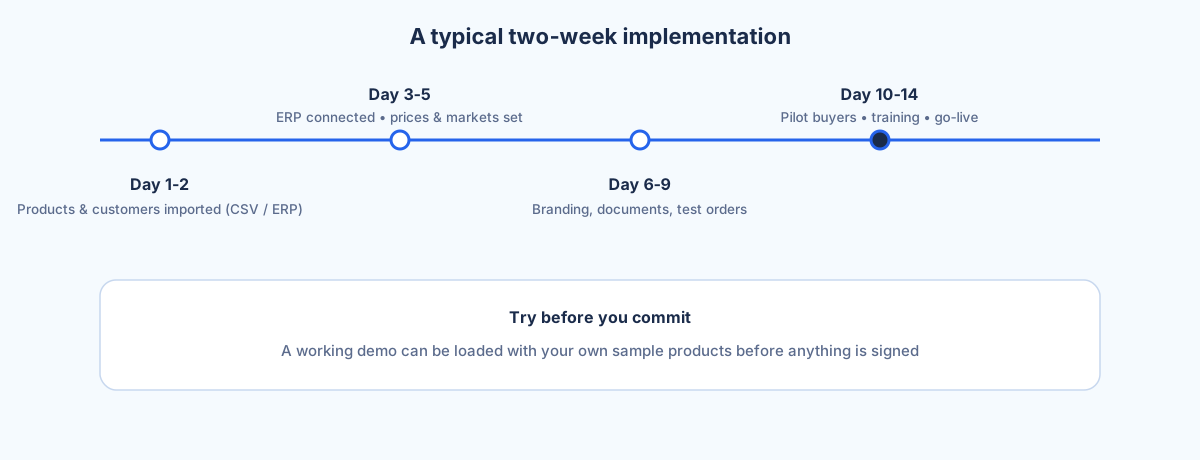
Days 3–5: ERP, prices and markets
With products in, the middle of week one wires up the commercial logic. The ERP connects via API — Selldi integrates with any ERP that exposes one, including SAP, Microsoft Dynamics 365 and NetSuite — so stock and documents can flow between the systems instead of being retyped. This is where the two systems learn to talk, and where most of the technical setup actually happens.
Alongside it comes the pricing that makes B2B B2B. Customers are organised into groups, each market with its own price shelf and currency; individual contract prices are set for the accounts that have negotiated them; credit terms and limits are attached so that deferred payment behaves the way your finance team expects. If you sell across borders, additional markets are set up here too, each with its own currency and language, because Selldi runs in eight languages and multiple currencies for EU cross-border trade. By the end of day five the platform knows who pays what, in which currency, and on what terms.
Days 6–9: branding, documents and test orders
The back half of the fortnight makes the store yours and proves it works. Branding is applied, and the legal documents — terms, privacy policy and the rest — are generated from the store's own company data, so the shop introduces itself as your business at your address, not as a generic template. This matters more than it sounds: a trade buyer who logs in and sees your name, your details and your terms trusts the portal in a way they never trust a half-finished one.
Then you run test orders end to end. A product goes into a cart at the right contract price, through checkout, with the correct delivery and payment terms, and out the other side as an order the ERP can see. You watch stock decrement. You check that a credit-limited customer is stopped at the right point. This is deliberately unglamorous work, and it is where the confidence to go live comes from — you have seen the whole path work before a real buyer touches it.
Days 10–14: pilot buyers, training and go-live
The final stretch brings in real people. Two or three pilot customers — ideally your friendliest accounts — get access and place genuine orders, and their confusion is the most useful data in the whole project. If they hesitate on a screen, that screen gets fixed before everyone sees it. In parallel your own team is trained: the operator who processes orders, the field rep who works the CRM, whoever manages pricing. Training is short precisely because the platform is already loaded with your data, so people learn on the real thing rather than a sandbox that looks nothing like their day.
By the end of week two the pilot is working, the team knows the platform, and go-live is less an event than a widening of the door — you open access to the rest of your customers on a system that has already been carrying real orders for days.
What your team actually has to provide
The two-week timeline assumes a few things from your side, and being blunt about them is the difference between hitting it and not. You need a reasonably clean product file — not perfect, but one where a code means one product and the units are filled in. You need your price rules written down somewhere other than a senior salesperson's memory: which group pays what, which accounts have contract prices, what the credit terms are. And you need two or three pilot customers who will genuinely log in and click, because a pilot nobody uses tells you nothing.
That is a short list, but each item is real work, and it is work only you can do. The platform cannot invent your pricing policy, and it cannot decide which customers are safe to pilot with. When these are ready on day one, two weeks is comfortable.
What can go wrong — and how it's absorbed
Data is where reality intrudes. Dirty data — duplicate codes, inconsistent units, prices that contradict each other between spreadsheets — is normal, and the import surfaces it rather than swallowing it. Missing EANs are common too; they do not stop the rollout, but they are worth filling in for the products you intend to push to marketplaces later, since those channels lean on them. The pattern is the same in each case: the problem is made visible early and fixed in the file, not discovered by a customer.
When it takes longer than two weeks
Two weeks is typical, not guaranteed, and it is fair to say what stretches it. Custom integrations are the biggest one — if you need Selldi to talk to a bespoke or aging system in a non-standard way, that is engineering time on top of the standard API connection, and it moves at the pace of the other system, not yours. The second is data archaeology: a catalogue that has grown for fifteen years across three people and two spreadsheets can need real reconstruction before it is fit to import, and there is no honest way to compress that into a couple of days.
The third cause is the quietest and the most common: decision latency on your side. The platform can be ready to set a price shelf on Tuesday, but if the answer to 'what should this group pay?' takes a week to come back from a meeting, the clock stops with it. None of these are failures — they are simply the parts of a rollout that depend on decisions and legacy that belong to your business, and they are worth naming in advance so nobody is surprised. The most useful first step is to see the standard path working: open the demo at demo.selldi.pl/showcase, load it with a slice of your own data, and judge the two weeks against your own catalogue rather than a promise.
Frequently asked questions
How long does a Selldi B2B implementation take?
A typical rollout runs about two weeks: roughly two days for product import, two to three for ERP, pricing and markets, a few for branding, documents and test orders, and the final stretch for pilot buyers, training and go-live. It can take longer where custom integrations, heavy data clean-up or slow decisions on the client side are involved.
How do products get into the platform?
Products import from a CSV using the columns wholesalers already keep — name, code, EAN, unit, net price, VAT, stock and category — and are published to your chosen channels as they load. The import also surfaces data problems like duplicate codes or missing units early, so they are fixed in the file rather than discovered by a customer.
Which ERP systems does Selldi connect to?
Selldi integrates with any ERP that exposes an API, including SAP, Microsoft Dynamics 365 and NetSuite. The connection is set up in the middle of the first week so that stock and documents flow between the systems instead of being retyped.
Can I evaluate the platform with my own data before committing?
Yes. A working demo can carry your sample data before any commitment, so you assess Selldi with your own products, prices and structure rather than a generic showcase. You can start at demo.selldi.pl/showcase and click through the platform as it would work for your catalogue.
What does my team need to prepare for the two weeks to hold?
Three things: a reasonably clean product file where each code means one product, your price rules written down (which group pays what, which accounts have contract prices, what the credit terms are), and two or three pilot customers willing to log in and place real orders. Each is real work only your business can do, and having it ready on day one is what keeps the timeline to two weeks.
Are the store's legal documents and branding generic?
No. Branding and the legal documents — terms, privacy policy and the rest — are generated from the store's own company data, so the portal presents itself as your business at your address. This is done in the second half of the rollout, before test orders and pilot access.