Migrating a Wholesale Business to a New B2B Platform Without Losing Customers

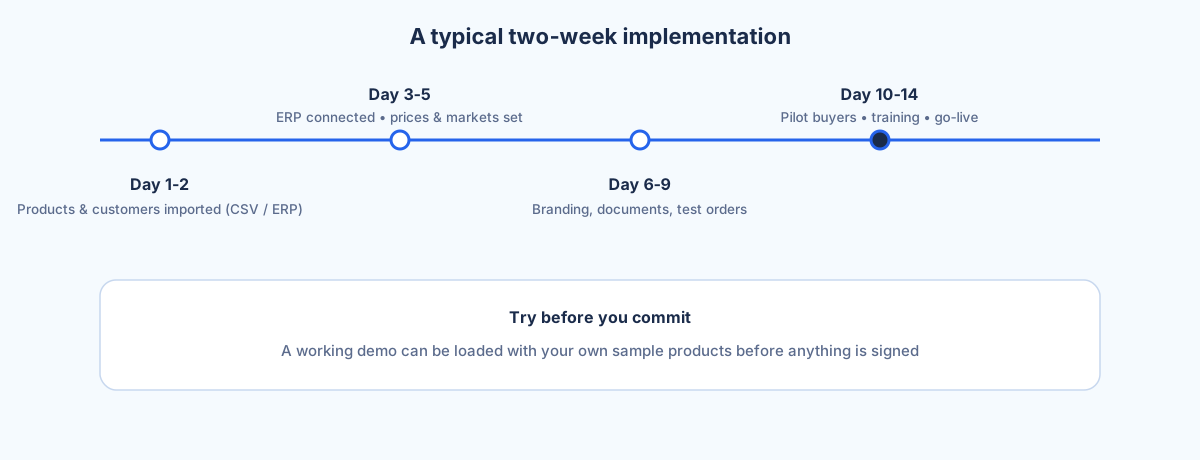
Migrating a wholesale business to a new B2B platform without losing customers comes down to protecting four things: individual pricing, credit terms, access to order history, and your buyers' login habits. Do that and the switch is invisible to the people who matter; get it wrong and your best account calls to say their prices are gone. Selldi is an all-in-one sales system for wholesalers and distributors that treats migration as data work, not a rebuild: products come in from a CSV (name, code, EAN, unit, net price, VAT, stock, category) and get published to the right channel automatically, customer accounts carry their groups, contract prices and payment terms, and your ERP stays the single source of truth over the API so history is never orphaned. Before you commit to anything, a working demo can be loaded with your own sample data so you see your catalogue and your customers behaving in the new system first. Typical implementation runs around two weeks, on either a subscription or a licence.
Why wholesalers put migration off for years
Most distributors know their B2B portal is dated long before they replace it. The reason they wait is rarely the technology. It is fear of touching the routine of the accounts that pay the bills. When a buyer at your biggest customer has been ordering the same forty SKUs the same way every Tuesday for six years, any change feels like a risk you are taking on their behalf. One confused login, one order that shows list price instead of their negotiated rate, and you have handed your competitor a reason to call them.
So the old system limps on. It cannot show live stock, it does not speak the languages of your export customers, the field reps keep a private spreadsheet of who pays what, and every new hire needs a week to learn where things are hidden. The cost of staying is real but quiet; the cost of migrating feels loud and immediate. That asymmetry is what keeps a lot of good wholesalers on software that is holding them back. The way out is not courage, it is method: knowing exactly what has to survive the move, and proving it survives before anyone flips a switch.
What actually has to survive a migration
Strip away the noise and a wholesale migration succeeds or fails on a short list. Individual and group prices have to land exactly as they were, because a customer's price is the relationship. Credit terms and limits have to carry over so a Net 30 buyer stays Net 30 and nobody is suddenly asked to prepay. Access to order history has to be preserved so a buyer can still see what they bought last quarter and reorder it in two clicks. And the login habit has to stay familiar, so the person placing the order recognises where they are and does not need retraining.
In Selldi these are handled as first-class data rather than afterthoughts. Customer accounts import with their groups, so market-level pricing applies the moment they log in, and individual prices sit on top for the accounts you negotiate one to one. Credit terms and limits travel with the account. Order history stays where it belongs: because the ERP remains the source of truth through the API, historical documents keep living in the system that already owns them, and the portal reads from it rather than trying to become a second, competing ledger. That single decision, ERP over API instead of a data fork, is what stops history from vanishing during a move.
The parallel-run approach
The safest migrations are never a hard cutover on a Monday morning. They run the new platform beside the old one for a short window. You load the catalogue and the accounts, you invite a handful of friendly customers and your own reps to place real orders, and you compare: does this buyer see the right price, does that order reach the ERP correctly, does the stock figure match the shelf. Because Selldi can stand up a demo populated with your own sample data, the parallel run starts before you have signed anything, not after. Your team is checking their real customers and their real SKUs, not a generic sandbox with fictional products.
When the parallel run is clean, the switch itself is boring, which is exactly what you want. You move the remaining accounts, point the field reps at the new CRM, and turn off the old portal. Nobody has a heart-stopping weekend because the risky discovery work already happened while both systems were live and the old one was still catching anything the new one missed. A migration that feels like a non-event is not luck. It is the payoff for running in parallel long enough to trust the numbers.
Data hygiene: the win nobody plans for
Every migration forces you to look at data you have been ignoring for years. The CSV export of your catalogue is where the skeletons come out: the same product listed twice under two codes, the EAN that was never filled in, the unit that says "each" when the customer buys by the pallet, the category tree that made sense in 2014. Pulling products into a new system through a clean import format, name, code, EAN, unit, net price, VAT, stock and category, is a natural moment to fix all of it, because the import will not accept the mess quietly.
The same is true of customers. A migration is when you discover the credit limit that should have been revoked, the duplicate account created after a typo in an email, the buyer who left the company two years ago and still has a login. Cleaning this up is not glamorous and it never appears on the project plan, but wholesalers who take it seriously come out the other side with a catalogue and a customer list that are genuinely accurate, often for the first time in a decade. The new platform gets the credit; the data hygiene did the work.
Telling your trade customers about the switch
The instinct is to over-explain a migration, and it is the wrong instinct. Your buyers do not care about your infrastructure. They care whether their prices are safe, whether ordering is easier, and whether anything is being asked of them. The message that works is short and led by benefit: your prices and terms are unchanged, ordering is now faster with live stock and easy reordering, and here is your login, which in most cases is the same one you already use. That is the whole email.
Save the detail for the accounts that ask, and let your field reps carry the message in person to the top tier, because a two-minute walkthrough from a familiar face beats any announcement. If you have export customers, this is also where eight languages and multi-currency stop being a feature list and start being a courtesy: a German or Italian buyer reading the switch notice in their own language, seeing prices in their own currency, is a customer who feels looked after rather than migrated. Communicated well, the change reads as an upgrade you did for them, not a project you did to them.
When to postpone the migration
Not every moment is the right one, and pretending otherwise helps nobody. If you are in the middle of a seasonal peak, do not migrate. The weeks when order volume is highest are the weeks when your team has the least attention to spare for parallel-run checks and when a mistake costs the most, so wait for the trough. If you are also replacing your ERP, sequence the two projects rather than running them at once. Because the platform leans on the ERP as the source of truth over the API, changing both foundations simultaneously means you cannot tell which system caused a discrepancy, and you double the risk for no benefit. Land the ERP first, let it settle, then migrate the B2B layer onto stable ground.
There is also a quieter reason to pause: if your data is genuinely chaotic and nobody has time to clean it, a migration will simply move the chaos into a nicer interface. In that case, spend a fortnight on the CSV and the customer list first, then start. A migration done on clean data in the off-season is calm. The same migration done on messy data mid-peak is the horror story people tell to justify staying on old software for another three years.
Frequently asked questions
How long does migrating to a new B2B platform take?
A typical Selldi implementation runs around two weeks, covering the product import, customer accounts with their prices and terms, and the ERP connection over the API. Complex catalogues or an ERP replacement running in parallel can extend that. The parallel-run period, where the new platform operates beside the old one, is time well spent and should not be rushed.
Do our customers need new logins after migration?
In most cases no. The goal of a good migration is that the buyer's login habit stays familiar so nobody needs retraining. Accounts are imported with their groups, individual prices and credit terms intact, so a customer logs in and immediately sees their own pricing exactly as before.
What happens to open orders during the switch?
This is exactly why the parallel-run approach matters and why migrations are best avoided during a seasonal peak. Open orders live in your ERP, which remains the source of truth over the API, so they are not stranded in the old portal. You let existing orders complete, run both systems in parallel briefly, and only retire the old platform once the pipeline is clean.
Can we keep our existing ERP?
Yes. Selldi is built to sit on top of your ERP rather than replace it, connecting to any ERP via API, including SAP, Microsoft Dynamics 365 and NetSuite. The ERP stays the single source of truth for stock, pricing and order history, and the B2B portal, B2C store and field-rep CRM read from it, which is what keeps historical data intact through the move.
Can we test the new platform with our own data before committing?
Yes, and it is the recommended first step. A working demo can be loaded with your own sample products and customers before any commitment, so you and your reps verify that real accounts see the right prices and that orders flow correctly. Checking your own catalogue rather than a generic sandbox is the fastest way to build confidence in the switch.