How to Get Real Value From a B2B Platform Demo
To get real value from a B2B platform demo, treat it as a hands-on test rather than a slideshow: bring five to ten of your own real products, two genuine customer scenarios, and insist on seeing both the buyer's view and the back office where your team works. A good vendor lets you drive. With Selldi you can start on the public demo at demo.selldi.pl/showcase, click through every role yourself, and then ask for a private demo loaded with your own sample data before any contract is signed. The point is to watch your messy reality survive contact with the software, not to admire a polished catalogue of someone else's products. If a platform only shines when the salesperson controls the mouse, that tells you something.
Bring your own products, not their showcase
Every demo environment is stocked with tidy sample data that hides the awkward parts of real wholesale. So bring your own. Pick five to ten products that represent the hard cases: one with variants (sizes, colours, packaging), one sold in an awkward unit (per metre, per pallet, per carton with a different quantity than the piece), and one that behaves differently for different customers. The moment you see a jacket in three colours and twenty-five sizes render as clean dropdowns instead of seventy-five separate buttons, you learn more than an hour of narration would teach you.
Ask what happens when you upload a spreadsheet of a few hundred SKUs. Ask how a product with a per-carton discount shows the saving to the buyer. These are the details that decide whether your catalogue managers spend their week fighting the tool or actually selling. A platform built for distributors will absorb the mess quietly; a repurposed consumer webshop will start asking you to simplify your own business.
Bring two real customer scenarios
Pricing is where B2B software earns or loses its keep, so bring two customers you actually recognise. The first should be your best account: the one with negotiated contract prices, a credit limit, and a payment term you granted years ago. The second should be a brand-new prospect on standard shelf pricing. Have the demo model both, side by side. You want to see the same product show one price to your loyal account and a different price to the newcomer, without anyone editing the product itself.
This is also where you find out whether the platform understands markets. If you sell domestically and also export, one of your scenarios should live in another currency and language. Watch what the export customer sees. If the number quietly falls back to your home currency because nobody set an export price, you have just discovered a limitation that would have embarrassed you in front of a foreign buyer.
See the buyer's view and the back office
A demo that only shows the storefront is half a demo. Your customers spend minutes on the platform; your sales reps and administrators spend their entire day there. Insist on seeing both. Log in as a customer, place an order, then switch seats and watch that order arrive in the rep's panel, become a document, and update stock. The handover between those two worlds is where cheap platforms fall apart, because the storefront and the back office were built by different teams with different assumptions.
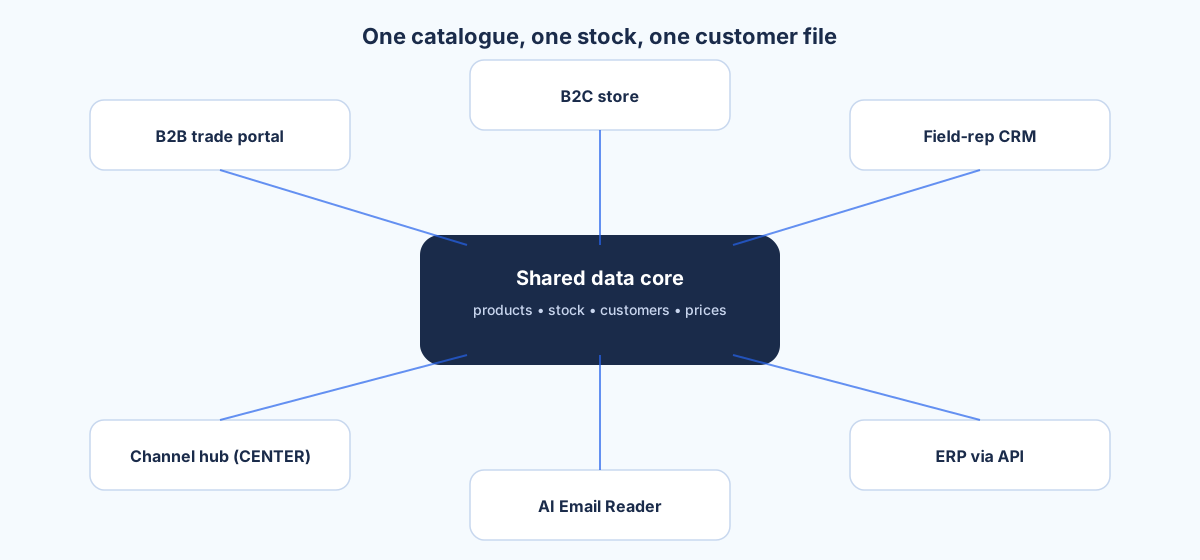
Selldi is built as one all-in-one sales system rather than a storefront with add-ons bolted on: the B2B portal, B2C store, field-rep CRM, the central offer and channel hub (CENTER), the AI Email Reader and the ERP integration share the same products, stock and customer data. In a demo that matters because you can follow a single order from the buyer's click all the way to the document without it changing shape between screens.
The ten things to test live
Come with a checklist and run it yourself. Each of these takes a minute and each one exposes a real capability, not a marketing claim:
- Log in as a customer and confirm you see YOUR price, not the shelf price.
- Add enough of one item to cross a quantity tier and watch the unit price drop.
- Place a fast order by pasting a list of product codes instead of clicking around.
- Give a customer a credit limit, then try to exceed it and confirm the order is blocked.
- Have an order that arrived by email turn into a draft the rep can review.
- Turn a customer's price request into an active offer and see it apply in the cart.
- Generate a real document PDF (a pro-forma or an offer) and open it.
- Change a price in the back office and find exactly where it lands for the buyer.
- Drop a product's stock to zero and confirm the storefront stops selling it.
- Switch to another language or currency and check the whole experience follows.
If the vendor can do all ten in front of you, on data that resembles yours, you are looking at a platform that was designed for wholesale. If several of them require a follow-up call, a custom development quote, or a promise that it is on the roadmap, adjust your expectations accordingly.
Questions that expose weak platforms
Some questions are uncomfortable on purpose. Ask them anyway. "Is the B2B module a paid add-on on top of the base product, or is it included?" reveals whether wholesale is a first-class feature or an afterthought. "Who maintains the connectors to my accounting and shipping systems, and what happens when their API changes?" reveals whether you are buying a maintained integration or a one-off script that will rot. "When you push an update, does it reach my store automatically, and can it break my customisations?" reveals how the vendor thinks about the years after go-live.
Selldi connects to any ERP via API, including SAP, Microsoft Dynamics 365 and NetSuite, and treats those connectors as maintained infrastructure rather than bespoke glue. That is the honest answer you want from any vendor: not a heroic promise that everything is possible, but a clear picture of who owns the moving parts after the sale.
When a demo is not enough
Here is the honest limit of any demo, including a good one: it cannot validate your data migration. Watching ten sample products behave well tells you the software works; it tells you nothing about whether your fifteen years of product history, customer contracts and price lists will import cleanly. Migration surprises live in the edge cases: the duplicate codes, the customers with two email addresses, the prices in three currencies. No demo surfaces those. Only a pilot with a real slice of your data does, which is why you should treat a private demo loaded with your samples as a rehearsal, and a paid pilot as the actual dress rehearsal.
So prepare, bring your own mess, run the ten tests yourself, and ask the awkward questions. When you are ready to start, open demo.selldi.pl/showcase and click through every role first, then ask for a private demo with your own products loaded before you commit to anything.
Frequently asked questions
What should I bring to a B2B platform demo?
Bring five to ten of your real products, including one with variants and one sold in an awkward unit, plus two genuine customer scenarios: your best account with contract prices and a credit limit, and a fresh prospect on standard pricing. Real data exposes limitations that the vendor's clean sample catalogue hides. If you export, make one scenario use another currency and language.
How long should a proper B2B demo take?
Long enough to run a checklist yourself, usually an hour or more rather than a fifteen-minute pitch. You want time to log in as a customer, place an order, then switch to the back office and follow that same order into a document and a stock change. If the vendor rushes you past the hands-on part, that is a signal in itself.
Can I test a B2B platform with my own data before signing?
Yes, and you should. Selldi offers a public demo at demo.selldi.pl/showcase where you can click through every role immediately, and a private demo can be loaded with your own sample products and customers before any contract. Seeing your real catalogue behave correctly is far more convincing than a generic showcase.
Does a demo prove my data will migrate cleanly?
No. A demo proves the software works on tidy data, but data migration succeeds or fails in the edge cases: duplicate codes, customers with multiple emails, prices in several currencies. Only a pilot with a real slice of your own data validates migration, so treat the demo as a rehearsal and budget for a proper pilot before full cutover.
What questions reveal a weak B2B platform?
Ask whether B2B is a paid add-on or included, who maintains the ERP and shipping connectors when their APIs change, and whether automatic updates can break your customisations. Weak platforms give vague or defensive answers, while a serious vendor gives you a clear map of who owns each moving part after go-live.