Fast Ordering for Wholesale Buyers: CSV, EAN and Reorders

Fast ordering means a wholesale buyer who already knows what they need can build a basket in seconds instead of clicking through a catalogue. In Selldi, the all-in-one sales system for wholesalers and distributors, a buyer pastes a list of product codes with quantities or uploads a CSV file, and the cart assembles itself while any line that cannot be matched is flagged clearly for review. They can also search and add items by SKU, manufacturer code or EAN, reorder a whole previous order in one click, save recurring shopping lists, and scan barcodes straight from the phone browser with no app to install. Prices stay correct because Selldi applies each customer's negotiated terms during entry, and units of measure (piece, case, pallet) are respected as the basket is built. The result is that repeat orders move off the phone and email and into the portal, where they are accurate and traceable.
The buyer who hates catalogues
There is a type of wholesale buyer who never browses. They run a workshop, a site or a shop, they know their assortment by heart, and every minute spent scrolling through a product tree feels wasted. For them a beautiful catalogue is friction, not help. What they want is a text box where they type or paste the codes they need and see a basket appear. Selldi gives them exactly that: a paste field that accepts a raw list of codes and quantities, matches each line against the catalogue, and shows the running total as it goes.
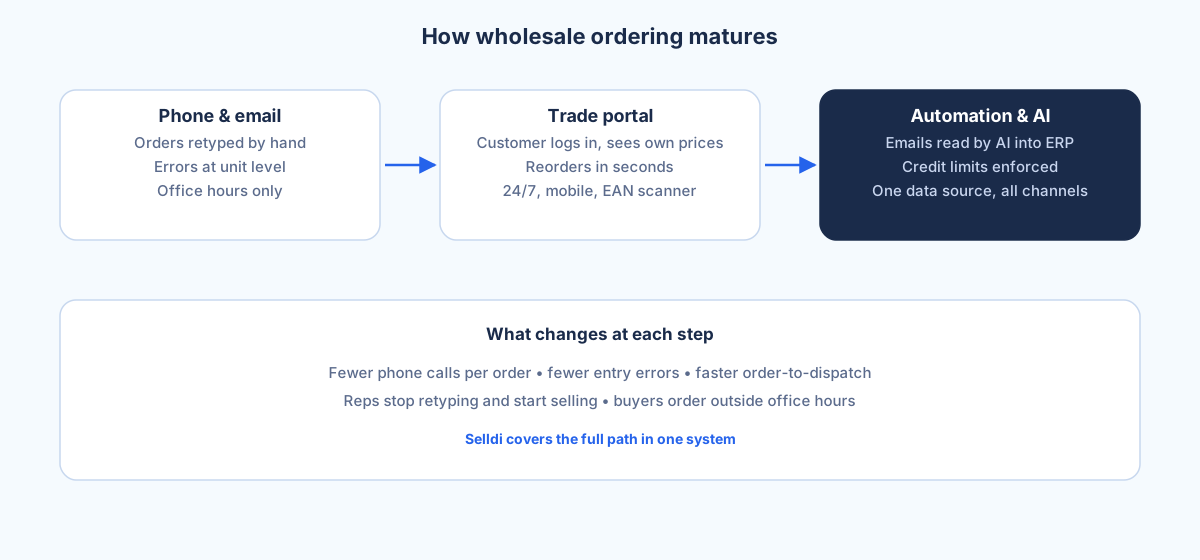
This matters more in B2B than most vendors admit. A distributor's best customers are usually the ones who order the same forty items every fortnight. Making those people scroll is how you lose them back to a phone call, where the order is faster for them but slower, more error-prone and less traceable for you. Cutting clicks is not a cosmetic nicety here; it is the difference between an order that lands in the portal cleanly and one that arrives as a voicemail your rep has to type up by hand.
The Excel-driven buyer
Plenty of purchasing still lives in a spreadsheet. A buyer keeps a working file with two columns, code and quantity, updates it as stock runs low, and that file is the order. Asking them to abandon it and re-key everything into a web form is a non-starter. So Selldi meets them where they are: they upload the CSV and the system reads it, or they copy the two columns and paste them straight in. Either way the cart is built from their file, not retyped.
The honest hard part of bulk entry is the lines that do not match, and this is where Selldi is deliberately explicit. A code with a typo, a discontinued item, a product the buyer is not entitled to see, or simply a code from a different supplier that slipped into the file, all of these are shown as unmatched rather than silently dropped. The buyer sees which lines went into the basket and which need attention, so a fifty-line paste never turns into a forty-eight-line order that nobody noticed was short. Flagging the misses is more useful than pretending the import was perfect.
The warehouse walk-round
The third scenario happens on foot. Someone walks the racks with a phone, sees an empty shelf, and needs to reorder that item on the spot. Selldi's mobile EAN scanner runs in the phone's browser, so the buyer points the camera at the barcode on the shelf edge or the last empty box, the product is identified, they set a quantity and it drops into the cart. No app to download, no store login, no IT ticket to get it approved on a work phone.
For a customer doing a stock walk this changes the rhythm of replenishment. Instead of writing shortages on paper and re-entering them at a desk an hour later, the order is captured at the point where the gap is noticed. Fewer forgotten lines, fewer emergency calls the next morning because something obvious was missed.
Getting units right at speed
Speed is worthless if it produces wrong orders, and in wholesale the classic mistake is units. A buyer means a case and gets a single piece, or means a pallet and orders a case, and the delivery is wrong before it leaves the building. Selldi carries units of measure through fast entry, so when a product is sold in pieces, cases and pallets, the buyer chooses the right one and the quantity and price adjust accordingly. A code list that says "CEM-32, 4" resolves against the unit the buyer intends, not a guess.
Because Selldi is one system rather than a bolt-on order form, the price a buyer sees during rapid entry is their own price. Customer-specific and market prices, negotiated deals and quantity breaks are applied as the basket is built, not recalculated later at a screen the buyer never checks. That keeps the promise of self-service intact: what they add is what they pay, in their currency and on their terms.
Reorders and saved lists
Most wholesale demand is repeat demand, so Selldi treats history as a shortcut. A buyer opens a past order and reorders the whole thing in one click, adjusting quantities before they confirm. They can save a recurring basket as a template, so the monthly standing order is one action rather than forty lookups. For genuinely fixed cycles, recurring orders let the same list come round on a schedule instead of being rebuilt by hand each time.
Put together, paste-a-list, add-by-code, scan-a-shelf, reorder and templates cover the way experienced buyers actually work. None of them require the buyer to learn the catalogue, because the whole point is that they already know it. Selldi's job is to get their knowledge into a clean order as fast as possible, then apply the right prices and units so the order is correct as well as quick.
When a catalogue matters more than speed
Fast ordering is built for people who know what they want, and that is exactly when it can be the wrong tool. A brand-new customer who has never bought from you does not have a code list; they are discovering your range and deciding whether to trust you. Pushing them straight at a paste box tells them nothing about what you sell or why it is good. The same is true for buyers exploring an adjacent category, or for products where photos, specifications and cross-sells genuinely drive the decision. In those cases the catalogue, the search, the category pages and the recommendations earn their place, and Selldi shows that side of the store too. The right model is both: a rich catalogue for discovery and a fast lane for the buyers who have moved past it. Forcing everyone down one path is the mistake, whichever path you pick.
Selldi runs the same fast-ordering tools across markets and currencies, with the interface in eight languages and export-friendly units, so a buyer in another country reorders exactly the way a domestic one does. It connects to any ERP via API, including SAP, Microsoft Dynamics 365 and NetSuite, so the clean orders that come out of fast entry flow into the systems that fulfil and invoice them.
Frequently asked questions
What happens to codes the system does not recognise?
Unmatched lines are shown to the buyer instead of being silently dropped. A typo, a discontinued item, a product the account is not entitled to, or a code from another supplier is flagged so the buyer can fix or remove it. The rest of the list still goes into the cart, so nothing is lost without notice.
Can wrong units be caught during fast entry?
Yes. Selldi carries units of measure through bulk and code-based entry, so a product sold in pieces, cases or pallets is added in the unit the buyer chooses, with quantity and price adjusting to match. This prevents the classic wholesale error of ordering a single piece when a case or pallet was intended.
Does fast ordering respect customer-specific prices?
It does. Because Selldi is one system rather than a separate order form, negotiated customer prices, market prices and quantity breaks are applied as the basket is built. What the buyer adds by code, CSV or scan is priced on their own terms and currency, not a generic list price.
Is the EAN scanner a separate app?
No. The barcode scanner runs in the phone's web browser, so there is nothing to install from an app store and no separate login. A buyer walking the warehouse can scan a shelf barcode and add the item to the cart straight from the phone they already have.
How do repeat orders work?
A buyer can reorder an entire past order in one click and adjust quantities before confirming, or save a basket as a template for standing monthly orders. For fixed cycles, recurring orders bring the same list round on a schedule, so regular replenishment is a single action rather than a rebuild each time.